目次

目次
はじめに
AI Integration Unitの山崎です。昨年末までBacklogのSREを担当していましたが、今年からAI Integration UnitでRAGや周辺技術の検証を行っています。
先日、Claude Opus 4.7 が Amazon Bedrock で利用可能になったというリリースが発表されました。
Claude Opus 4.7 is now available in Amazon Bedrock – AWS
このリリース文に次の一節があります。
Claude Opus 4.7 also advances visual capabilities with high-resolution image support improving accuracy on charts, dense documents, and screen UIs where fine detail matters.
Claude Opus 4.7 は視覚的な能力も向上しており、高解像度の画像サポートにより、細部の精度が求められるチャート、情報量の多いドキュメント、画面 UI での認識精度が改善されています。
「チャート」「情報密度の高いドキュメント」における精度向上が謳われています。RAG を構築する際には、グラフや図表の数値を正確に読み取ることが求められる場面があります。本記事では Amazon Bedrock の Claude を使用して、PDF 内のチャート画像の認識精度を検証します。この検証では2つのアプローチを比較します。
参考情報
- Claude Opus 4.7 is now available in Amazon Bedrock – AWS
- Migration guide – Claude API Docs
- 総務省|令和7年版 情報通信白書|PDF版
- Amazon S3 Vectors を使って図表を含む PDF ファイルでシンプルな RAG を構築
検証内容
本記事の検証は次の問いに答えることを意図しています。
- Claude Opus 4.7 は、既存の Claude Sonnet 4.6 や Claude Opus 4.6 と比べて、PDF 内のチャート画像を具体的にどの程度詳細に読めるのか
- PDF を丸ごと LLM に渡す方式(Approach 1)と、画像化して RAG を構築する方式(Approach 2)でどう変わるのか
- Approach 2 の場合、ingest 段階の設定(システムプロンプトと画像の DPI)が精度にどの程度影響するのか
Approach 2 については、以前の記事「Amazon S3 Vectors を使って図表を含む PDF ファイルでシンプルな RAG を構築」で構築した PDF RAG のコードを下敷きにしています。元記事の時点ではモデル選定やプロンプトの詳細検証まで踏み込んでいなかったため、本記事では詳細な検証を行います。ベクトルストアには Amazon S3 Vectors を使用します。
検証対象
検証対象 PDF は総務省「情報通信白書令和7年版 PDF版」第Ⅰ部第1章第2節「AIの爆発的な進展の動向」の12ページです。主要チャートとして「図表Ⅰ-1-2-4 AI活力ランキング上位10カ国(2023年)」を使用します。このチャートは8つの評価カテゴリ(R&D、Responsible AI、Economy、Education、Diversity、Policy and Governance、Public Opinion、Infrastructure)で構成された横棒スタックチャートで、細部の読み取りが問われる題材です。
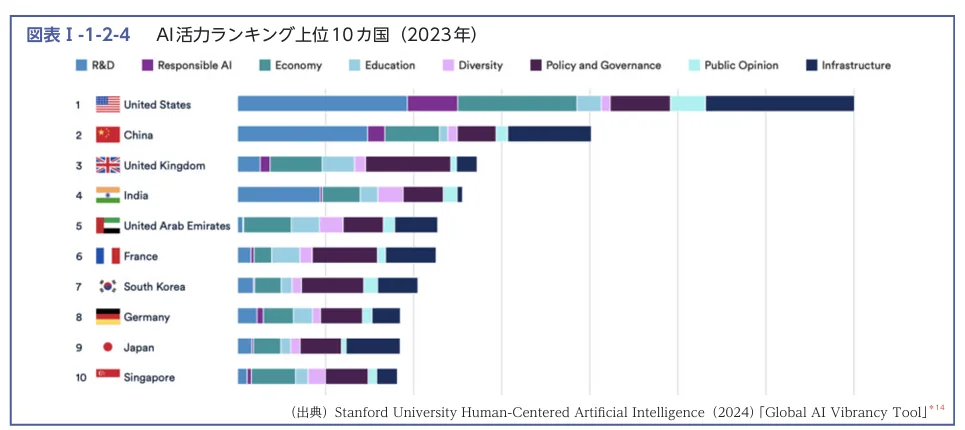 図表Ⅰ-1-2-4 AI活力ランキング上位10カ国(2023年)
検証環境
使用サービスとモデル
| 項目 | 値 |
|---|---|
| リージョン | us-east-1 |
| 推論モデル | us.anthropic.claude-sonnet-4-6, us.anthropic.claude-opus-4-6-v1, us.anthropic.claude-opus-4-7 |
| 埋め込みモデル | amazon.titan-embed-text-v2:0 |
| ベクトルストア | Amazon S3 Vectors |
スクリプトの配置
Bedrock-Claude/
├── data/
│   └── n1120000.pdf  # 情報通信白書令和7年版 PDF版
├── scripts/
│   ├── common.py
│   ├── questions.json
│   ├── approach1_pdf_direct.py
│   ├── approach2_ingest.py
│   ├── approach2_query.py
│   └── build_summary.py
├── results/
│   ├── approach1-pdf-direct.{md,json}
│   ├── approach2-rag_ingest-*_answer-*.{md,json}
│   └── summary.md
├── requirements.txt
└── README.md
Python 環境
requirements.txt:
boto3>=1.35
pdf2image>=1.17
Pillow>=10.0
pdf2image がシステム依存として poppler-utils を必要とします。
sudo apt install poppler-utils
uv venv
uv pip install -r requirements.txt
S3 Vectors バケットの作成
Approach 2 の事前準備として、S3 Vectors バケットを一つ作成しておきます。
aws s3vectors create-vector-bucket \
  --vector-bucket-name bedrock-claude-chart \
  --profile YOUR_PROFILE --region us-east-1
評価質問
評価質問は1問に絞り、人手で回答の正誤と粒度を判定します。複数の評価質問で検証を行う場合はq02, q03…というように追加します。
[
  {
    "id": "q01",
    "question": "AI活力ランキングで5位の国はどこですか? そのほかの順位も教えてください。また、それぞれの国はどのような分野で優れているかも教えてください。",
    "notes": "AI活力ランキングの基本読み取り"
  }
]
共通コード
scripts/common.py に Bedrock/S3 Vectors クライアントの初期化と、Converse/埋め込み/チャンク分割のユーティリティをまとめます。
scripts/common.py
"""Bedrock-Claude PDFチャート認識検証の共通ユーティリティ。"""
import json
import time
from pathlib import Path

import boto3

REGION = "us-east-1"
PROFILE = "xxxxxxxxx"

MODELS = {
    "sonnet-4-6": "us.anthropic.claude-sonnet-4-6",
    "opus-4-6":   "us.anthropic.claude-opus-4-6-v1",
    "opus-4-7":   "us.anthropic.claude-opus-4-7",
}

EMBED_MODEL_ID = "amazon.titan-embed-text-v2:0"
EMBED_DIM = 1024
CHUNK_SIZE = 1024
CHUNK_OVERLAP = CHUNK_SIZE // 10  # 10%オーバーラップでチャンク境界の文脈を保持

ROOT = Path(__file__).resolve().parent.parent
PDF_PATH = ROOT / "data" / "n1120000.pdf"
QUESTIONS_PATH = ROOT / "scripts" / "questions.json"
RESULTS_DIR = ROOT / "results"


def session():
    """AWS SSO プロファイルを使ったセッションを返す。"""
    return boto3.Session(profile_name=PROFILE, region_name=REGION)


def bedrock_runtime():
    """Bedrock Runtime クライアントを返す。"""
    return session().client("bedrock-runtime")


def s3vectors():
    """S3 Vectors クライアントを返す。"""
    return session().client("s3vectors")


def load_questions():
    """questions.json から評価質問リストを読み込む。"""
    return json.loads(QUESTIONS_PATH.read_text(encoding="utf-8"))


def load_pdf_bytes():
    """検証対象 PDF をバイト列で返す。"""
    return PDF_PATH.read_bytes()


def converse(client, model_id, content, max_tokens=2048):
    """Bedrock Converse API を呼び出し、テキスト回答とトークン使用量を返す。

    Opus 4.7 は temperature が廃止されているため additionalModelRequestFields で
    thinking と effort を設定する。他モデルは temperature=0 で出力を固定する。
    失敗時は指数バックオフで最大3回リトライする。
    """
    inference_config = {"maxTokens": max_tokens}
    extra = {}
    if "opus-4-7" in model_id:
        # Opus 4.7: temperature は Breaking Change で廃止。thinking と effort で制御する
        extra["additionalModelRequestFields"] = {
            "thinking": {"type": "adaptive"},
            "output_config": {"effort": "high"},
        }
    else:
        # Opus 4.7 以外: temperature=0 で出力のランダム性を抑制する
        inference_config["temperature"] = 0
    started = time.monotonic()
    for attempt in range(3):
        try:
            resp = client.converse(
                modelId=model_id,
                messages=[{"role": "user", "content": content}],
                inferenceConfig=inference_config,
                **extra,
            )
            break
        except Exception:
            if attempt == 2:
                raise
            time.sleep(2 ** attempt)  # 指数バックオフ: 1s → 2s
    blocks = resp["output"]["message"]["content"]
    text = next(b["text"] for b in blocks if "text" in b)
    usage = resp.get("usage", {})
    return text, {
        "input_tokens": usage.get("inputTokens", 0),
        "output_tokens": usage.get("outputTokens", 0),
        "latency_sec": round(time.monotonic() - started, 2),
    }


def embed(client, text):
    """Titan Embed Text v2 でテキストを 1024 次元のベクトルに変換する。"""
    resp = client.invoke_model(
        modelId=EMBED_MODEL_ID,
        body=json.dumps({"inputText": text, "dimensions": EMBED_DIM, "normalize": True}),
    )
    return json.loads(resp["body"].read())["embedding"]


def chunk_text(text):
    """テキストを CHUNK_SIZE 文字ごとに分割し、CHUNK_OVERLAP 文字のオーバーラップを持たせる。"""
    step = CHUNK_SIZE - CHUNK_OVERLAP
    return [text[i:i + CHUNK_SIZE] for i in range(0, len(text), step)]


def write_results(name, md, payload):
    """結果を Markdown と JSON の2形式で results/ ディレクトリに書き出す。"""
    RESULTS_DIR.mkdir(exist_ok=True)
    (RESULTS_DIR / f"{name}.md").write_text(md, encoding="utf-8")
    (RESULTS_DIR / f"{name}.json").write_text(
        json.dumps(payload, ensure_ascii=False, indent=2), encoding="utf-8"
    )
converse() 関数は temperature=0 を既定で指定します。Anthropic の Migration guide によると、Claude Opus 4.7 では temperature、top_p、top_k のパラメータが廃止され、デフォルト値以外で使用すると 400 エラーが発生するとのことです。そのため、Claude Opus 4.7 では temperature を指定しないようにしました。Opus 4.7 向けの設定(thinking と effort)については後述の「effort パラメータの追加」節で詳しく扱います。
Approach 1: PDF直接読み取り
Bedrock Converse API の document ブロックに PDF のバイナリを直接渡して質問する最小構成です。
scripts/approach1_pdf_direct.py
"""Approach 1: Bedrock Converse API の document ブロックでPDFを直接読ませる。"""
import common


def ask(client, model_id, pdf_bytes, question):
    """PDF バイナリを document ブロックに渡してモデルに質問する。"""
    content = [
        # PDF を document ブロックとして直接渡す(Bedrock は最大 4.5MB をサポート、Claude モデルは最大 100 ページをサポート)
        {"document": {"format": "pdf", "name": "target", "source": {"bytes": pdf_bytes}}},
        {"text": question},
    ]
    return common.converse(client, model_id, content)


def to_markdown(results):
    """全モデルの回答結果を1つの Markdown レポートにまとめる。"""
    lines = ["# Approach 1: PDF直接読み取り", ""]
    any_key = next(iter(results))
    for i, row in enumerate(results[any_key]):
        q = row["question"]
        lines += [f"## {q['id']}: {q['question']}", "", f"観点: {q.get('notes', '')}", ""]
        for key, rows in results.items():
            r = rows[i]
            header = f"### {key} (in/out={r['input_tokens']}/{r['output_tokens']}, {r['latency_sec']}s)"
            lines += [header, "", r["answer"], ""]
    return "\n".join(lines)


def main():
    """3モデル × 全質問で PDF 直接読み取りを実行し、結果を保存する。"""
    client = common.bedrock_runtime()
    pdf_bytes = common.load_pdf_bytes()
    questions = common.load_questions()

    results = {}
    for key, model_id in common.MODELS.items():
        print(f"== {key} ==")
        rows = []
        for q in questions:
            print(f"  {q['id']}")
            answer, m = ask(client, model_id, pdf_bytes, q["question"])
            rows.append({"question": q, "answer": answer, **m})
        results[key] = rows

    common.write_results("approach1-pdf-direct", to_markdown(results), results)
    print("results/approach1-pdf-direct.md")


if __name__ == "__main__":
    main()
実行します。
uv run python scripts/approach1_pdf_direct.py
Approach 1 の結果
| モデル | input tokens | output tokens | latency |
|---|---|---|---|
| sonnet-4-6 | 37,919 | 415 | 17.05s |
| opus-4-6 | 37,919 | 790 | 22.22s |
| opus-4-7 | 77,200 | 1,017 | 40.36s |
Opus 4.7 は他モデルの約2倍の入力トークンを消費しました。リリース文にあった「high-resolution image support」のとおり、内部で画像を高い解像度で処理している分が、トークン数に現れているようです。
回答の精度には明確な差が出ました。Sonnet 4.6 は順位は全て正解したものの、各国の分野別強みは「資料に記載されていない」と回答しました。Opus 4.6 は6位以降の順位で誤認があり(6位=韓国、7位=ドイツ、8位=カナダなど)、分野別は各国について推定を返しました。Opus 4.7 は順位を完全に正解した上で、8カテゴリの各指標に触れながら10カ国全てについて分野別の強みを記述しました。
Approach 1 / opus-4-7 の回答:
## 順位(1〜10位)

| 順位 | 国 |
|------|-----|
| 1位 | 米国(United States) |
| 2位 | 中国(China) |
| 3位 | 英国(United Kingdom) |
| 4位 | インド(India) |
| 5位 | アラブ首長国連邦(United Arab Emirates) |
| 6位 | フランス(France) |
| 7位 | 韓国(South Korea) |
| 8位 | ドイツ(Germany) |
| 9位 | 日本(Japan) |
| 10位 | シンガポール(Singapore) |

## 各国が優れている分野について

- 米国(1位): 全指標でバランスよく突出。特にR&D、Economy、Infrastructureで他国を大きく引き離す圧倒的なスコア
- 中国(2位): R&D、Economyで特に高いスコア。政策・ガバナンス、インフラ面でも強み
- 英国(3位): R&D、Policy and Governance、Educationでバランスの取れた強さ
- インド(4位): Economy、Diversityに特徴。人材面・経済規模での存在感
- アラブ首長国連邦(5位): Policy and Governance、Infrastructureが相対的に強い
- フランス(6位): Policy and Governance、Responsible AIに強み
- 韓国(7位): Infrastructure、R&Dで特徴
- ドイツ(8位): R&D、Economyで一定の強み
- 日本(9位): 各指標でバランスはあるが、米・中・英からは大きく水をあけられている
- シンガポール(10位): Policy and Governance、Educationで相対的な強み
リリース文の「チャートでの精度向上」の主張に沿って、確かに Opus 4.7 は Sonnet 4.6 や Opus 4.6 より明確に粒度の高い回答を生成しました。
Approach 2: RAG
Approach 2 は ingest と query の2ステップに分けます。
- ingest: ページを画像化し、Claude で Markdown に変換。Titan Embed v2 で埋め込んで S3 Vectors に格納する
- query: 質問を埋め込んで S3 Vectors から top-5 を検索し、その文脈で Claude に回答させる
Ingest 側
scripts/approach2_ingest.py
"""Approach 2 / Step 1: PDFをベクトル化してS3 Vectorsへ登録する。"""
import argparse
import io
import json
import uuid

from pdf2image import convert_from_bytes

import common

IMAGE_PROMPT = """\
Extract the content from an image page and output in Markdown syntax. Enclose the content in the <markdown></markdown> tag and do not use code blocks. If the image is empty then output a <markdown></markdown> without anything in it.

Follow these steps:

1. Examine the provided page carefully.

2. Identify all elements present in the page, including headers, body text, footnotes, tables, images, captions, and page numbers, etc.

3. Use markdown syntax to format your output:
    - Headings: # for main, ## for sections, ### for subsections, etc.
    - Lists: * or - for bulleted, 1. 2. 3. for numbered
    - Do not repeat yourself

4. If the element is an image (not table)
    - If the information in the image can be represented by a table, generate the table containing the information of the image
    - Otherwise provide a detailed description about the information in image
    - For charts specifically, work through the following steps in order before writing the final table:
        - Step 1 - Structure: Identify the chart type (bar, stacked bar, line, pie, etc.), read the title, axis labels with units, and list all legend categories with their colors or patterns
        - Step 2 - Scale: Note the numerical range of each axis (min, max, major gridlines) so you can derive estimates
        - Step 3 - Per-item extraction: For every item (row/country/data point), read or estimate the value of EACH series separately. Do not skip any item
        - Step 4 - Estimate unlabeled values: When no label is printed, estimate by comparing bar length to the axis scale. Mark each estimate with a leading ~. Provide numeric estimates (e.g., ~85) rather than qualitative labels (e.g., "large")
        - Step 5 - Table: Output a table with one row per item and one column per series. Add a total column when totals are visible. Do not omit any item or series
    - Classify the element as one of: Chart, Diagram, Logo, Icon, Natural Image, Screenshot, Other. Enclose the class in <figure_type></figure_type>
    - Enclose <figure_type></figure_type>, the table or description, and the figure title or caption (if available), in <figure></figure> tags
    - Do not transcribe text in the image after providing the table or description

5. If the element is a table
    - Create a markdown table, ensuring every row has the same number of columns
    - Maintain cell alignment as closely as possible
    - Do not split a table into multiple tables
    - If a merged cell spans multiple rows or columns, place the text in the top-left cell and output ' ' for other
    - Use | for column separators, |-|-| for header row separators
    - If a cell has multiple items, list them in separate rows
    - If the table contains sub-headers, separate the sub-headers from the headers in another row

6. If the element is a paragraph
    - Transcribe each text element precisely as it appears

7. If the element is a header, footer, footnote, page number
    - Transcribe each text element precisely as it appears

Output Example: (省略)
"""


def render_pages(pdf_bytes, dpi=300):
    """PDF をページごとに PNG 画像に変換して返す。DPI が高いほど細部まで読める。"""
    pages = []
    for img in convert_from_bytes(pdf_bytes, dpi=dpi):
        buf = io.BytesIO()
        img.convert("RGB").save(buf, format="PNG")
        pages.append(buf.getvalue())
    return pages


def image_to_markdown(client, model_id, png_bytes):
    """PNG 画像を Claude に渡して Markdown テキストに変換する。トークン使用量も返す。"""
    content = [
        {"image": {"format": "png", "source": {"bytes": png_bytes}}},
        {"text": IMAGE_PROMPT},
    ]
    md, usage = common.converse(client, model_id, content, max_tokens=3500)
    return md, usage


def main():
    """PDF の全ページを画像化して Markdown に変換し、S3 Vectors インデックスに登録する。"""
    ap = argparse.ArgumentParser()
    ap.add_argument("--model", required=True, choices=list(common.MODELS))
    ap.add_argument("--bucket", required=True)
    args = ap.parse_args()

    bedrock = common.bedrock_runtime()
    vectors = common.s3vectors()
    pdf_bytes = common.load_pdf_bytes()

    # 全ページを画像化し、Claude で Markdown に変換してチャンク分割する
    chunks = []
    page_usages = []
    for i, png in enumerate(render_pages(pdf_bytes)):
        print(f"  page {i}: image->markdown")
        md, usage = image_to_markdown(bedrock, common.MODELS[args.model], png)
        page_usages.append(usage)
        chunks.extend(common.chunk_text(md))

    # S3 Vectors は create_index が冪等でないため、再実行時は先に削除してから作成する
    index_name = f"chart-rag-{args.model}"
    try:
        vectors.delete_index(vectorBucketName=args.bucket, indexName=index_name)
    except vectors.exceptions.NotFoundException:
        pass
    vectors.create_index(
        vectorBucketName=args.bucket,
        indexName=index_name,
        dataType="float32",
        dimension=common.EMBED_DIM,
        distanceMetric="cosine",
        metadataConfiguration={"nonFilterableMetadataKeys": ["source_text"]},
    )

    # チャンクを埋め込みベクトルに変換し、500件ずつバッチ投入する(API の上限)
    records = [
        {
            "key": str(uuid.uuid4()),
            "data": {"float32": common.embed(bedrock, c)},
            "metadata": {"source_text": c[:4000]},
        }
        for c in chunks
    ]
    for i in range(0, len(records), 500):
        vectors.put_vectors(
            vectorBucketName=args.bucket,
            indexName=index_name,
            vectors=records[i:i + 500],
        )
    print(f"indexed {len(records)} vectors into {index_name}")

    # ページごとのトークン使用量を集計して JSON に保存する
    total_input = sum(u["input_tokens"] for u in page_usages)
    total_output = sum(u["output_tokens"] for u in page_usages)
    n = len(page_usages)
    ingest_stats = {
        "model": args.model,
        "pages": n,
        "total_input_tokens": total_input,
        "total_output_tokens": total_output,
        "avg_input_tokens_per_page": round(total_input / n),
        "avg_output_tokens_per_page": round(total_output / n),
        "per_page": page_usages,
    }
    out_path = common.RESULTS_DIR / f"approach2-rag_ingest-{args.model}.json"
    common.RESULTS_DIR.mkdir(exist_ok=True)
    out_path.write_text(json.dumps(ingest_stats, ensure_ascii=False, indent=2))
    print(f"ingest stats -> {out_path}")
    print(f"total input: {total_input}, total output: {total_output}, avg/page: {total_input//n}/{total_output//n}")


if __name__ == "__main__":
    main()
IMAGE_PROMPT は元記事 Amazon S3 Vectors を使って図表を含む PDF ファイルでシンプルな RAG を構築 の instruction_for_image_parsing() をベースにしています。Step 4 の「画像判定」部分をチャート向けに拡張しており、後述の比較実験を経て最終的に Step 1〜5 の手順指示形式に至りました。
S3 Vectors の create_index は同名インデックスが既存の場合にエラーを返すため、再実行を考慮して delete_index を先に試みる構成にしています。put_vectors は1リクエスト500件が上限なので、バッチに分けて投入します。
Query 側
scripts/approach2_query.py
"""Approach 2 / Step 2: S3 Vectorsへクエリし、Claudeで回答する。"""
import argparse

import common

ANSWER_PROMPT = """\
あなたはPDFドキュメントのアナリストです。以下の検索結果のみを根拠に質問に回答してください。
検索結果に情報がない場合は「資料内に該当する情報がありません」と答えてください。

## 検索結果
{context}

## 質問
{question}
"""


def retrieve(vectors, bucket, index, query_vec, top_k=5):
    """質問ベクトルで S3 Vectors を検索し、上位 top_k チャンクのテキストを返す。"""
    resp = vectors.query_vectors(
        vectorBucketName=bucket,
        indexName=index,
        topK=top_k,
        queryVector={"float32": query_vec},
        returnMetadata=True,
    )
    return [v["metadata"]["source_text"] for v in resp.get("vectors", [])]


def answer(client, model_id, question, contexts):
    """検索コンテキストを組み込んだプロンプトで Claude に回答させる。"""
    # 複数チャンクを "---" で区切って1つのコンテキストブロックにまとめる
    prompt = ANSWER_PROMPT.format(context="\n---\n".join(contexts), question=question)
    return common.converse(client, model_id, [{"text": prompt}])


def to_markdown(args, rows):
    """回答結果を Markdown レポート形式に変換する。"""
    lines = [f"# Approach 2: RAG (ingest={args.ingest_model}, answer={args.answer_model})", ""]
    for r in rows:
        q = r["question"]
        lines += [
            f"## {q['id']}: {q['question']}",
            "",
            f"観点: {q.get('notes', '')}",
            "",
            f"- in/out tokens: {r['input_tokens']}/{r['output_tokens']}",
            f"- latency: {r['latency_sec']}s",
            "",
            "### 回答",
            r["answer"],
            "",
            "### 検索コンテキスト(先頭120文字)",
        ]
        for i, c in enumerate(r["contexts"]):
            lines.append(f"- [{i}] {c[:120]}...")
        lines.append("")
    return "\n".join(lines)


def main():
    """質問を埋め込み→ベクトル検索→Claude 回答の流れで RAG クエリを実行する。"""
    ap = argparse.ArgumentParser()
    ap.add_argument("--ingest-model", required=True, choices=list(common.MODELS))
    ap.add_argument("--answer-model", required=True, choices=list(common.MODELS))
    ap.add_argument("--bucket", required=True)
    args = ap.parse_args()

    bedrock = common.bedrock_runtime()
    vectors = common.s3vectors()
    # ingest 時に使ったモデルと対応するインデックスを参照する
    index_name = f"chart-rag-{args.ingest_model}"

    rows = []
    for q in common.load_questions():
        print(f"  {q['id']}")
        qv = common.embed(bedrock, q["question"])          # 質問をベクトル化
        contexts = retrieve(vectors, args.bucket, index_name, qv)  # 類似チャンクを取得
        text, m = answer(bedrock, common.MODELS[args.answer_model], q["question"], contexts)
        rows.append({"question": q, "contexts": contexts, "answer": text, **m})

    name = f"approach2-rag_ingest-{args.ingest_model}_answer-{args.answer_model}"
    common.write_results(name, to_markdown(args, rows), rows)
    print(f"results/{name}.md")


if __name__ == "__main__":
    main()
--ingest-model と --answer-model は独立に指定できるようにしています。本記事では両者を揃えて実行します。
実行コマンド
for m in sonnet-4-6 opus-4-6 opus-4-7; do
  uv run python scripts/approach2_ingest.py \
    --model $m --bucket bedrock-claude-chart
done

for m in sonnet-4-6 opus-4-6 opus-4-7; do
  uv run python scripts/approach2_query.py \
    --ingest-model $m --answer-model $m \
    --bucket bedrock-claude-chart
done
IMAGE_PROMPT と DPI の組み合わせ比較
Approach 2 の精度は、ingest 段階の Image→Markdown 変換品質に強く依存します。この変換は IMAGE_PROMPT の書き方と画像の解像度(DPI)の2因子で大きく変わるため、2×2 の組み合わせで切り分けます。
2因子の定義
IMAGE_PROMPT の2種類です。
- 元記事版(ref-prompt): 元記事の
instruction_for_image_parsing()と同等のプロンプト(後述のチャート特化ブロックを含まない) - チャート特化版(chart-prompt): 元記事版に後述のチャート特化ブロックを追加したプロンプト
DPI の2種類です。
- DPI=150: 画像が小さくトークン節約になる
- DPI=300: 画像は約4倍の面積だが細部まで読める
パターン B/C で追加したチャート特化の5項目は以下です(比較実験時点のプロンプト)。
For charts specifically:
    - First, transcribe the chart title, axis labels with units, legend categories
      (with any color or pattern mapping), and data source
    - If numerical values are labeled on bars, points, or segments, record them exactly
    - If values are NOT labeled, estimate them by reading the scale (gridlines, ticks,
      or relative bar length) and mark each estimate with a leading ~
    - For stacked, grouped, or multi-series charts (stacked bars, clustered bars,
      multi-line, multi-pie), output a table with one row per item and one column
      per series. Include a total column when the chart shows totals
    - Prefer a structured table over prose whenever the chart carries numerical
      or categorical data
approach2_ingest.py のコードは最終形(Step 1〜5版)です。4つのパターン
| パターン | IMAGE_PROMPT | DPI | max_tokens |
|---|---|---|---|
| A | ref-prompt | 150 | 2,500 |
| B | chart-prompt | 150 | 3,500 |
| C | chart-prompt | 300 | 3,500 |
| D | ref-prompt | 300 | 2,500 |
max_tokens はチャート特化版で推定値テーブル等の長い出力を許容するため 3500 に引き上げています。
各パターンの Opus 4.7 回答抜粋
3モデル全ての結果で傾向の差がわかりやすかった Opus 4.7 の回答を、パターンごとに抜粋します。
パターン A(ref-prompt + DPI=150)
上位10カ国の順位一覧(省略、正解と一致)

各国がどの分野で具体的に優れているかについての個別の内訳情報は、
資料内に該当する情報がありません。
パターン D(ref-prompt + DPI=300)
上位10カ国の順位一覧(省略、正解と一致)

## 各国が優れている分野について
資料内で明示されているのは以下のみです:
- 米国: 圧倒的に高く、特にR&DとInfrastructureで突出している
- 中国: 2位で米国に続く

それ以外の国が具体的にどの分野で優れているかについては、
資料内に該当する情報がありません。
パターン B(chart-prompt + DPI=150)
上位10カ国の順位一覧(省略、正解と一致)

## 各国が優れている分野について
検索結果には、ランキングが8つのカテゴリから構成されていることは示されていますが、
各国がそれぞれどの分野で優れているかに関する具体的な情報は、
資料内に該当する情報がありません。
パターン C(chart-prompt + DPI=300)
## 上位10カ国の順位一覧

| 順位 | 国名 | スコア(推定) |
|------|------|----------------|
| 1位 | アメリカ合衆国 | 約70 |
| 2位 | 中国 | 約30 |
| 3位 | イギリス | 約17 |
| 4位 | インド | 約16 |
| 5位 | アラブ首長国連邦 | 約13 |
| 6位 | フランス | 約11 |
| 7位 | 韓国 | 約10 |
| 8位 | ドイツ | 約10 |
| 9位 | 日本 | 約9 |
| 10位 | シンガポール | 約9 |

## 各国が優れている分野について
検索結果で具体的に言及されているのは、1位のアメリカ合衆国のみで、
以下の分野で優位性を示しています:
- R&D(研究開発)
- Economy(経済)
- Infrastructure(インフラ)
パターン C だけが総合スコアの推定値を表として返しました。IMAGE_PROMPT でチャート特化ブロックを追加したことで、チャートの長さからスコアを推定したと思われます。ただし、1位のアメリカは妥当なスコアですが、2位以下はスコアが10ほどずれているようです。(画像内の10,20…の数字は筆者が説明のために加工したものです)
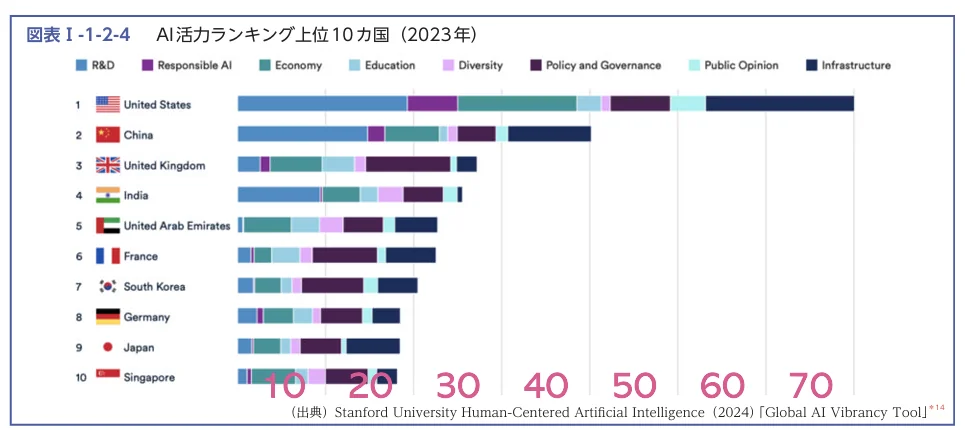 スコア推定の例
他のパターンは「資料内に該当する情報がありません」で止まっています。
観察と結論
ref-prompt では DPI を上げても分野別の数値情報が引き出されず(A も D も「情報なし」)、chart-prompt でも DPI=150 では数値情報が出ません(B)。両方が揃ったパターン C で初めて総合スコアの推定値が現れます。
つまりこの検証では、IMAGE_PROMPT の工夫と DPI の引き上げは単独では効果が限定的で、両方を揃えたときに初めて定量的な読み取りが始まります。リリース文が言及する「high-resolution image support」は、ingest 側の pdf2image の DPI 引き上げでも同様の効果を発揮しますが、それを活かすにはプロンプト側が「推定値でよいから書き出す」という指示を明示的に与える必要があります。加算ではなく AND の関係といえます。
temperature=0 検証で触れます。Sonnet 4.6 ではパターン C で以下のような8カテゴリに moderate/small のラベルを付けた回答が得られました(10カ国中4カ国の抜粋)。分野別の記述には踏み込みますが、数値推定までは至りません。
| 順位 | 国 | 特に強い分野 |
|------|-----|-------------|
| 1位 | アメリカ | R&D・経済・インフラが特に大きく、責任あるAI・教育・多様性・ガバナンスも中程度 |
| 2位 | 中国 | R&D・経済が特に大きい |
| 5位 | UAE | 責任あるAI・ガバナンスが中程度 |
| 9位 | 日本 | R&Dが中程度(他分野は小規模)|
Opus 4.6 は順位の読み取り自体に揺らぎが残ります。パターン C では「6位=ドイツ、7位=韓国、8位=フランス」と誤認し、カテゴリ別は ■ 記号の羅列で具体的に読み取れないと回答しました。DPI を 300 に上げても改善しないため、モデルの横棒スタックチャート解釈能力の限界と考えられます。
Opus 4.7 の temperature 廃止と再現性の確保
LLM の出力には確率的な揺らぎがあり、同一条件で再実行しても結果が変わります。scripts/common.py の converse() 関数では inferenceConfig に temperature: 0 を指定して揺らぎを抑えています。
Claude Opus 4.7 における temperature の扱い
Claude Opus 4.7 は temperature、top_p、top_k の指定が Breaking change として削除されています(Anthropic Migration guide 参照)。デフォルト値以外を設定すると 400 エラーになります。Amazon Bedrock のドキュメントはこの変更を未反映の状態ですが、Amazon Bedrock 経由でも同様の制約が適用されます。
converse() 関数はモデル ID を見て Opus 4.7 のときだけ temperature を除外しています。
inference_config = {"maxTokens": max_tokens}
extra = {}
if "opus-4-7" in model_id:
    extra["additionalModelRequestFields"] = {
        "thinking": {"type": "adaptive"},
        "output_config": {"effort": "high"},
    }
else:
    inference_config["temperature"] = 0
effort パラメータの追加
effort は temperature の代替ではなく、従来の thinking: {type: "enabled", budget_tokens: N} の代替として位置づけられています。思考の深さとトークン消費量のバランスを調整するためのパラメータです(値: low / medium / high / xhigh / max)。
thinking: {type: "adaptive"} は Claude Opus 4.7 でデフォルトオフです。thinking フィールドを指定しないリクエストは thinking なしで動作し、Opus 4.6 と同じ挙動になります。有効化するには thinking: {type: "adaptive"} を明示的に指定する必要があります(Migration guide – Breaking changes 参照)。Bedrock Converse API には標準パラメータとして存在しませんが、additionalModelRequestFields 経由で渡せることを確認しました。
以下は最初に検証した xhigh の例です(本記事の最終コードは effort: high を使用)。
if "opus-4-7" in model_id:
    extra["additionalModelRequestFields"] = {
        "thinking": {"type": "adaptive"},
        "output_config": {"effort": "xhigh"},
    }
effort: xhigh を単独で適用したところ、5回の query 実行で全て正確な順位を返し、出力トークン数も 474〜626 で安定しました。しかしパターン C で稀に出た最良回(スコア推定テーブルが出た実行)と比べると、分野別の詳細は「米国のみ」で止まり、精度は安定するが詳細は抑制される方向に振る舞いました。
step-by-step プロンプトとの組み合わせ
AnthropicはBreaking Changesのなかで、temperatureの廃止にともなって プロンプティングで挙動を誘導する ことを推奨しています。(原文)
Prompting is the recommended way to guide model behavior on Claude Opus 4.7.
Claude Opus 4.7 では、プロンプトを使用してモデルの動作を誘導することが推奨されています。
従来はtemperature=0に設定することで出力のばらつきを抑えていましたが、この手段は利用できなくなりました。そこで、回答精度のばらつきを抑えつつ詳細な回答も引き出すことを、プロンプティングによる挙動誘導で実現することを試みました。
IMAGE_PROMPT にチャート読み取りの手順を明示することで、effort=xhigh 単独では得られなかった詳細な分野別記述が安定して出力されるようになりました。チャート特化ブロックを「5項目の並列指示」から「Step 1〜5 の手順指示」に変えて再実行したところ、5回中5回で全10カ国の分野別強みが安定して出力されました。
変更後のチャート特化ブロックです。
For charts specifically, work through the following steps in order before writing the final table:
    - Step 1 - Structure: chart type, title, axis labels, all legend categories with colors/patterns
    - Step 2 - Scale: numerical range of each axis (min, max, major gridlines)
    - Step 3 - Per-item extraction: for every item, read or estimate the value of EACH series. Do not skip any item
    - Step 4 - Estimate unlabeled values: compare bar length to scale, mark each estimate with ~,
               provide numeric estimates (e.g., ~85) not qualitative labels (e.g., "large")
    - Step 5 - Table: one row per item, one column per series, do not omit any item or series
| 設定 | 5回の出力傾向 | 全10カ国分野詳細 | output tokens |
|---|---|---|---|
| パターン C(effort なし) | 揺らぎ大 | 0〜1/5 | 555〜850 |
| effort=xhigh のみ | 安定 | 0/5 | 474〜626 |
| step-by-step + effort=xhigh | 安定 | 5/5 | 1,078〜1,175 |
| step-by-step + effort=high | 安定 | 5/5 | 811〜930 |
high と xhigh で精度は同等ですが、high の方が output tokens が約20〜25%少なくなりました。step-by-step プロンプトが推論の手順を明示しているため、モデルが自力で探索するための余裕(xhigh の追加コスト)が不要になっていると解釈できます。本記事では effort: high を採用します。
step-by-step プロンプトが IMAGE_PROMPT レベルで Opus 4.7 の推論を構造化することで、temperature 非対応による揺らぎを事実上打ち消しています。数値推定(~85 のような形)ではなく定性ラベルにとどまりますが、全10カ国×8カテゴリの分野別記述が安定して生成されます。
step-by-step + effort=high / opus-4-7 の回答:
## 5位の国
アラブ首長国連邦(United Arab Emirates)です。主に「Policy and Governance(政策・ガバナンス)」と
「Infrastructure(インフラ)」の分野で比較的評価されています。

## その他の順位と各国が優れている分野

| 順位 | 国 | 特に優れている分野 |
|---|---|---|
| 1位 | 米国 | R&D、Infrastructureが非常に高く、Economy、Responsible AI、Policy and Governanceも高評価 |
| 2位 | 中国 | R&D、Economy、Infrastructureが高評価 |
| 3位 | 英国 | R&D、Economy、Policy and Governance、Infrastructureなど全体的に中程度 |
| 4位 | インド | R&D、Economy、Policy and Governance、Infrastructureが中程度 |
| 5位 | アラブ首長国連邦 | Policy and Governance、Infrastructureが中程度 |
| 6位 | フランス | Policy and Governance、Infrastructureが中程度 |
| 7位 | 韓国 | Policy and Governance、Infrastructureが中程度 |
| 8位 | ドイツ | Infrastructureが中程度(その他は低め) |
| 9位 | 日本 | Infrastructureが中程度(その他は低め) |
| 10位 | シンガポール | Infrastructureが中程度(その他は低め) |
effort パラメータの Bedrock Converse API 対応は公式ドキュメントに明記されていません。本記事の時点では additionalModelRequestFields 経由で動作することを確認しましたが、今後の API 変更で挙動が変わる可能性があります。結果の総合比較
サマリー生成は scripts/build_summary.py で results/approach1-pdf-direct.json と results/approach2-rag_ingest-*_answer-*.json を読み込んでまとめます。
scripts/build_summary.py
"""結果JSONから比較サマリーMarkdownを作成する。"""
import json
from pathlib import Path

ROOT = Path(__file__).resolve().parent.parent
RES = ROOT / "results"
MODELS = ("sonnet-4-6", "opus-4-6", "opus-4-7")

APP1 = json.loads((RES / "approach1-pdf-direct.json").read_text(encoding="utf-8"))
APP2 = {
    m: json.loads((RES / f"approach2-rag_ingest-{m}_answer-{m}.json").read_text(encoding="utf-8"))
    for m in MODELS
}

QIDS = [r["question"]["id"] for r in APP1[MODELS[0]]]


def rows_of(source):
    """質問 ID をキーにした辞書に変換する。"""
    return {r["question"]["id"]: r for r in source}


def fmt(r):
    """トークン数とレイテンシを 'input/output (Xs)' 形式の文字列にフォーマットする。"""
    return f"{r['input_tokens']}/{r['output_tokens']} ({r['latency_sec']}s)"


header = "| 実行 | " + " | ".join(QIDS) + " |"
sep = "| --- | " + " | ".join("---" for _ in QIDS) + " |"
lines = ["# 検証結果サマリー", "", "## 入力/出力トークンとレイテンシ", "", header, sep]
for m in MODELS:
    r = rows_of(APP1[m])
    lines.append(f"| A1 / {m} | " + " | ".join(fmt(r[q]) for q in QIDS) + " |")
for m in MODELS:
    r = rows_of(APP2[m])
    lines.append(f"| A2 / {m} | " + " | ".join(fmt(r[q]) for q in QIDS) + " |")

lines += ["",
          "A1 = Approach 1 (PDF直接読み取り), A2 = Approach 2 (RAG)",
          "フォーマット: `input_tokens/output_tokens (latency)`"]

(RES / "summary.md").write_text("\n".join(lines) + "\n", encoding="utf-8")
print("results/summary.md")
uv run python scripts/build_summary.py
Approach 1(A1)は PDF 直渡しのため IMAGE_PROMPT や DPI の設定は影響しません。Approach 2(A2)はパターン C(chart-prompt + DPI=300)での実行値です。
| 実行 | input tokens | output tokens | latency |
|---|---|---|---|
| A1 / sonnet-4-6 | 37,919 | 415 | 17.05s |
| A1 / opus-4-6 | 37,919 | 790 | 22.22s |
| A1 / opus-4-7 | 77,200 | 1,017 | 40.36s |
| A2 / sonnet-4-6 | 3,049 | 675 | 10.84s |
| A2 / opus-4-6 | 3,636 | 593 | 9.1s |
| A2 / opus-4-7 | 3,950 | 742 | 8.42s |
Approach 1 の入力トークンが Approach 2 の約10〜20倍です。連続して質問する用途では、RAG の圧倒的なコスト優位があります。ただし Approach 2 は ingest で LLM 呼び出しを12ページ×3モデル分行うため、1回のセットアップコストは別途発生します。
精度の観点で整理すると次のようになります。
- Approach 1: Opus 4.7 が10カ国×8カテゴリの分野別記述まで踏み込んだ最も詳細な回答を生成。入力トークン量は大きいが単発質問なら効果に見合う
- Approach 2 パターン C: Opus 4.7 が稀にスコア推定値を返すことがあるが再現性は低い(0〜1/5 程度)。Sonnet 4.6 は10カ国の分野別を定性的に表現
- Approach 2 パターン A/B/D: 順位は全モデル正解だが、分野別は「情報なし」で止まる
まとめ
Claude Opus 4.7 のリリース文にあった「チャートや情報密度の高いドキュメントでの精度向上」を、PDF 内の横棒スタックチャートで実測してみました。
- Approach 1(PDF 直渡し)では、確かに Opus 4.7 だけが10カ国×8カテゴリの分野別記述に踏み込めました。Sonnet 4.6 / Opus 4.6 は分野別を返せないか誤認がありました
- Approach 2(RAG)では、IMAGE_PROMPT の工夫と DPI 引き上げの両方が揃ったパターン C でのみ、Opus 4.7 が推定値テーブルを返せるようになりました。どちらか一方では不十分で、AND の関係です
- Opus 4.7 は
temperatureが Breaking change として削除されており、出力が揺らぎます。Anthropic の推奨に従いプロンプティングで挙動を誘導する方針を取り、IMAGE_PROMPT に「Step 1〜5 の手順指示」を加えました。effort: highは思考の深さを調整するためのパラメータとして別途追加しています - プロンプトの手順指示と
effort: highを組み合わせることで、全10カ国×8カテゴリの分野別テーブルが5回中5回安定して生成されました。プロンプトが推論の方向を与え、effort がその思考深度を確保する役割分担です
Opus 4.7 の「high-resolution image support」は確かに効いていますが、RAG のように画像を前処理してベクトル化する経路では、解像度を上げるのはアプリ側の ingest パイプラインの役目です。モデル側の精度向上を生かすには、DPI・IMAGE_PROMPT・effort の3つを同時に設計する必要がある、というのが今回の検証の学びです。
クリーンアップ
検証終了後は S3 Vectors のインデックスとバケットを削除します。
for m in sonnet-4-6 opus-4-6 opus-4-7; do
  aws s3vectors delete-index \
    --vector-bucket-name bedrock-claude-chart \
    --index-name chart-rag-$m \
    --profile YOUR_PROFILE --region us-east-1
done

aws s3vectors delete-vector-bucket \
  --vector-bucket-name bedrock-claude-chart \
  --profile YOUR_PROFILE --region us-east-1
AWS費用
本記事の検証スクリプトを各1回実行した場合の AWS 費用の見積もりを示します。主なコスト要因は LLM の呼び出し(Converse API)です。
料金単価(オンデマンド)
| サービス | Input (per MTok) | Output (per MTok) |
|---|---|---|
| Claude Sonnet 4.6 | $3.00 | $15.00 |
| Claude Opus 4.6 | $5.00 | $25.00 |
| Claude Opus 4.7 | $5.00 | $25.00 |
| Titan Embed Text v2 | $0.02 | – |
Amazon S3 Vectors のインデックスストレージとクエリ費用は、本検証規模(ベクトル数 110 件程度)では $0.01 未満のため省略しています。
Approach 1(approach1_pdf_direct.py)
3モデル × 1問の Converse 呼び出しを行いました。トークン数は実測値です。
| モデル | Input | Output | 費用 |
|---|---|---|---|
| sonnet-4-6 | 37,919 | 415 | $0.12 |
| opus-4-6 | 37,919 | 790 | $0.21 |
| opus-4-7 | 77,200 | 1,017 | $0.41 |
| 小計 | $0.74 |
Approach 2 Ingest(approach2_ingest.py × 3モデル)
12ページ × 各1回の Converse 呼び出し(画像→Markdown 変換)と Titan Embed v2 による埋め込みを実行しました。トークン数は実測値です。
| モデル | Input合計 | Output合計 | 費用 |
|---|---|---|---|
| sonnet-4-6 | 32,352 | 21,560 | $0.42 |
| opus-4-6 | 32,352 | 20,798 | $0.68 |
| opus-4-7 | 75,108 | 21,807 | $0.92 |
| 小計 | $2.02 |
Titan Embed v2 の埋め込みコスト(3モデル合計 110チャンク)は $0.001 未満で無視できます。
Approach 2 Query(approach2_query.py × 3モデル)
各1問の Converse 呼び出しを実行しました。トークン数は実測値です。
| モデル | Input | Output | 費用 |
|---|---|---|---|
| sonnet-4-6 | 3,049 | 675 | $0.02 |
| opus-4-6 | 3,636 | 593 | $0.03 |
| opus-4-7 | 3,950 | 742 | $0.04 |
| 小計 | $0.09 |
合計
| スクリプト | 費用 |
|---|---|
| Approach 1 | $0.74 |
| Approach 2 Ingest | $2.02 |
| Approach 2 Query | $0.09 |
| 合計 | 約 $2.85 |