


You can now download the User List as a CSV
Hello from the Backlog Development Team!
Thank you for always using Backlog.
We are excited to announce a new feature that allows administrators to download the user list in CSV format. With this update, you can also easily check the project participation status for each user.
Overview of the New Feature
Administrators can now download the user list in CSV format from the “Users” screen under “Space Settings.” In addition to basic information like User IDs and email addresses, the CSV file includes data such as the number of projects each user has joined and the project keys for those active projects.
Background
Previously, it wasn’t possible to view a consolidated list of users’ active projects or their last login times. Because of this, it took a significant amount of time for administrators to determine whether inactive users should be organized or deleted.
With this update, you can export all the necessary information for user auditing at once in a CSV file. This streamlines the process of cleaning up unnecessary user accounts.
Furthermore, leaving unnecessary access privileges unattended can increase the risk of information leaks. Conducting regular audits using this new feature will help you maintain a secure environment by ensuring that users only have the minimum required permissions.
What You Can Do With This Update
This new feature enables the following:
- All auditing criteria in one place: You can check crucial information, such as last login times and active projects, directly in the CSV. This allows you to confidently decide whether a specific user account is safe to delete.
- Reduced management costs: The auditing process that previously required checking each project individually can now be completed simply by downloading a CSV. This significantly reduces the workload for administrators, making regular audits much easier to maintain.
- Identify users with no active projects: You can easily pinpoint users who are not participating in any projects straight from the CSV.
How to Use
Here are the steps to download the user list as a CSV:
- Click your profile icon in the global bar and select “Space Settings”.
- Click “Users”.
- Click “Download User List as CSV”.
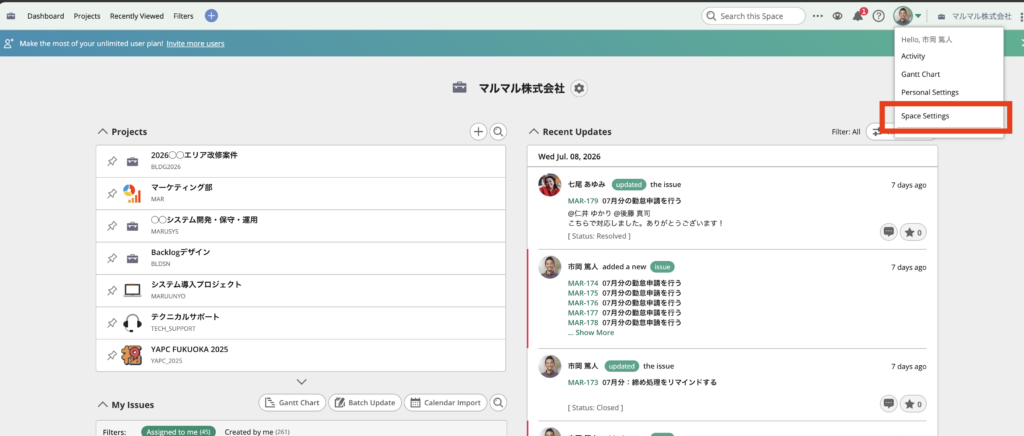
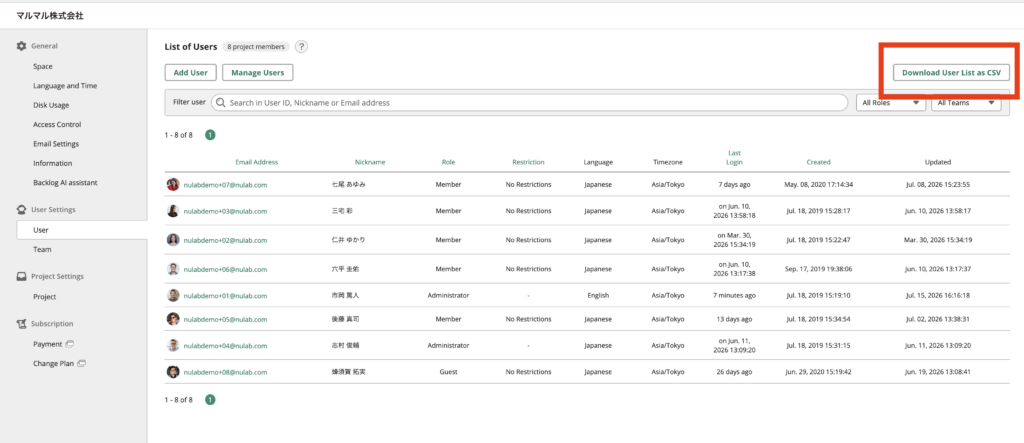
The downloaded CSV file will include the following fields:
- User ID
- Nickname (Display Name)
- Email Address
- Role
- Date Registered
- Date Updated
- Status
- Last Login Time
- Number of Joined Projects
- Number of Joined Archived Projects
- Joined Project Keys (excluding archived projects)
Important Notes
Please keep the following points in mind when using this feature:
- Only Administrators can download the CSV file.
- If a user logs in with the “Keep me logged in” option checked, their last login time might not update during that retention period. Because of this, the displayed time may occasionally differ from their actual last login time.
Conclusion
In this post, we introduced the new update that allows you to export your user list in CSV format. We hope this feature helps you streamline user management and strengthen security within your organization.
The Backlog Development Team will continue making improvements to make your teamwork more enjoyable and seamless. If you have any questions or concerns, please feel free to reach out to us via our contact form.
Until next time,
Happy Backlogging!